
Picture a customer two blocks away searching for exactly what you sell. Your competitor shows up on the map. You don’t. That moment happens hundreds of times a month, and it decides who gets the call.
A local SEO audit shows you why. It checks everything that affects how you appear in local search, from your Google profile to your reviews. This guide walks you through it in nine simple steps.
Table of Contents
What Is a Local SEO Audit?
A local SEO audit is a review of how well your business shows up when nearby people search for what you offer. It checks the places Google, map apps, and AI tools use to learn about you. Then it shows you what to fix first.
A regular SEO audit looks mostly at your website. A local SEO audit goes further. It also checks your Google Business Profile, your listings on other sites, and your reviews.
Google says local results depend on three things: relevance, distance, and prominence. Relevance is how well your profile matches the search. Distance is how far you are from the searcher. Prominence is how well-known your business is. You can’t change distance, but an audit helps you improve the other two.
Why a Local SEO Audit Matters in 2026
Local search is changing fast. BrightLocal’s 2026 Local Consumer Review Survey found that 45% of consumers now use AI tools to find local businesses. Just a year earlier, only 6% did.
Google is still the top choice, but its lead is shrinking. In the same survey, 71% of consumers used Google to check out local businesses, down from 83% in 2025.
Reviews matter more than ever, too. BrightLocal found that 97% of consumers read reviews. What’s more, 74% only care about reviews from the last three months.
Google also keeps changing its tools. In December 2025, it began replacing the Q&A section on Business Profiles with an AI-powered “Ask” button. So, a profile that looked fine last year may now have gaps. A fresh local SEO audit catches them.
Local SEO Audit Tools You’ll Need
You can do most of this audit with free tools. Paid local SEO audit tools save time, especially if you have more than one location.
| Tool | What it helps you check | Cost |
| Google Business Profile | Profile details, calls, and direction requests | Free |
| Google Search Console | Local search terms and indexing issues | Free |
| PageSpeed Insights | Mobile speed and Core Web Vitals | Free |
| Rich Results Test | LocalBusiness schema code | Free |
| BrightLocal | Citations and local rankings | Paid |
| Local Falcon | Map rankings across a grid of locations | Paid |
Before you start, open a simple spreadsheet. Write down your exact business name, address, and phone number (NAP) as they should appear everywhere. You’ll compare every listing against this version.
Step 1: Audit Your Google Business Profile
Your Google Business Profile is the most important part of a local SEO audit. In Whitespark’s 2026 Local Search Ranking Factors survey, experts ranked your primary category as the top factor for map rankings. Keywords in your business title and your business hours also made the top five.
A good Google Business Profile audit checks these items:
- Primary category: Is it the most specific match for your main service?
- Business name: Does it match your real-world sign?
- Address or service area: Is it correct and verified?
- Phone and website: Do they work, and do they match your site?
- Hours: Are they accurate, including holiday hours?
- Photos: Have you added recent, real photos of your business?
- Services: Is every main service listed with a short description?
- Posts: Have you shared an update in the last month?
You might be tempted to add extra keywords to your business name. However, this breaks Google’s guidelines and can get your profile suspended. Use your real name only.
Also open the Performance tab. It shows how people find you and whether they call, visit your site, or ask for directions. Write these numbers down so you can measure progress later.
Step 2: Check Your NAP and Citations
A citation is any online mention of your business name, address, and phone number. Common examples include Yelp, Bing Places, Apple Business Connect, and Facebook.
Search for your business on each major site. Then compare each listing with the NAP in your spreadsheet.
Look for:
- Old addresses or phone numbers
- Small differences, such as “Street” vs. “St.”
- Duplicate listings for the same location
- Broken or wrong website links
Mixed details confuse search engines and AI tools. In fact, Whitespark found that three of the top five factors for AI search visibility were citation factors. So, fix the errors on the biggest sites first, then work down your list.
Step 3: Review Your Reviews
Reviews affect both your rankings and your sales. Start by noting your review count and average rating on Google. Then compare them with the top three businesses in your local map results.
Next, check four simple things:
- Recency: Do you get new reviews every month?
- Rating: Is your average at least four stars? BrightLocal found that 68% of consumers want a business rated four stars or higher.
- Replies: Have you answered every review, good and bad? In fact, 89% of consumers expect a reply.
- Spread: Do you have reviews on more than one site?
Never buy reviews or offer rewards for them. Instead, build a simple habit of asking happy customers for a review after each job.
Step 4: Check Your Website’s Local Signals
Your website backs up everything in your profile. So, the next part of a local SEO audit checks your site for clear local signals.
- NAP on every page: Put your name, address, and phone number in the footer as text, not as an image.
- Location pages: If you serve more than one city, give each one its own page with unique, useful content.
- Titles and headings: Include your main service and city, such as “Plumber in Austin, TX.”
- LocalBusiness schema: Add this code so search engines can read your details. Then test it with Google’s Rich Results Test.
- Mobile speed: Many local searches happen on phones. Yet the 2025 Web Almanac found that only 48% of mobile sites had good Core Web Vitals.
- Contact page: Add a map and make your phone number tap-to-call.
Make sure your site and your Google Business Profile show the exact same details. Even small differences can weaken trust.
Step 5: Check Your Local Rankings
Local rankings change from street to street. A business can rank first near its office and not show up at all two miles away. That’s why one rank check isn’t enough.
Instead, use a grid tool such as Local Falcon or BrightLocal. These tools check your map ranking from many points around your area. The result is a heat map that shows where you’re strong and where you’re missing.
Pick five to ten keywords that bring in paying customers. For example, a dentist might track “dentist near me,” “teeth cleaning,” and “emergency dentist.” Record your current rank for each one. This becomes your starting point.
Step 6: Audit Your Local Links
Links from other local websites show Google that your community knows and trusts you. Use Google Search Console, Ahrefs, or Semrush to see who links to your site.
Look for links from local news sites, chambers of commerce, sponsors, suppliers, and community groups. Then flag any spammy or unrelated links. Finally, list a few easy local link ideas, such as a sponsorship or a story in the local paper.
Step 7: Compare Yourself With Competitors
Search your main keywords and note the top three businesses in the map results. Then compare their profiles and websites with yours.
| What to compare | Questions to ask |
| Categories | Which primary category do they use? |
| Reviews | How many do they have, and how recent are they? |
| Photos and posts | How often do they update their profile? |
| Website | Do they have a page for each service and city? |
| Links | Which local sites link to them but not to you? |
This step shows exactly where you fall behind. It also gives you a clear target to beat.
Step 8: Check Your AI Search Visibility
More customers now ask AI tools for local recommendations. So, a modern local SEO audit should check them too.
Open ChatGPT, Perplexity, and Google’s AI Mode. Then ask simple questions, such as “best plumber in [your city].” Note whether your business shows up, and which competitors appear instead.
AI tools pull from many of the same sources as local search. These include your Business Profile, review sites, directories, and your website. Google also says there’s no special trick for its AI results. So, the fixes from steps 1 to 7 usually improve your AI visibility as well.
Step 9: Rank Your Fixes and Track Results
By now, you’ll have a long list of issues. Don’t try to fix everything at once. Instead, sort each issue by how much it helps and how hard it is to fix.
Start with quick, high-impact fixes, such as a wrong primary category or an old phone number. Then move to bigger projects, like new location pages or a review plan. This is the simplest way to improve local SEO rankings without wasting effort.
Track the same numbers you recorded during the audit. These include map rankings, profile calls, direction requests, and website visits. Check them again after 30, 60, and 90 days.
How Often Should You Do a Local SEO Audit?
Run a full local SEO audit every six months. In busy markets, do one every quarter. Also check your profile and reviews each month, because details can change without warning.
Local SEO Audit Checklist
Use this local SEO audit checklist to work through each step.
- Primary category is the best match for your main service
- Business name matches your real-world sign
- Address, phone, website, and hours are correct
- Recent photos, services, and posts are added
- NAP matches on all major directories
- Duplicate listings are removed
- New reviews arrive every month, and all have replies
- NAP appears as text on every web page
- Each city you serve has its own page
- LocalBusiness schema passes the Rich Results Test
- Mobile pages pass Core Web Vitals
- Map rankings are tracked with a grid tool
- Local link gaps and competitor gaps are listed
- AI tools are tested for your main searches
- All fixes are ranked by impact
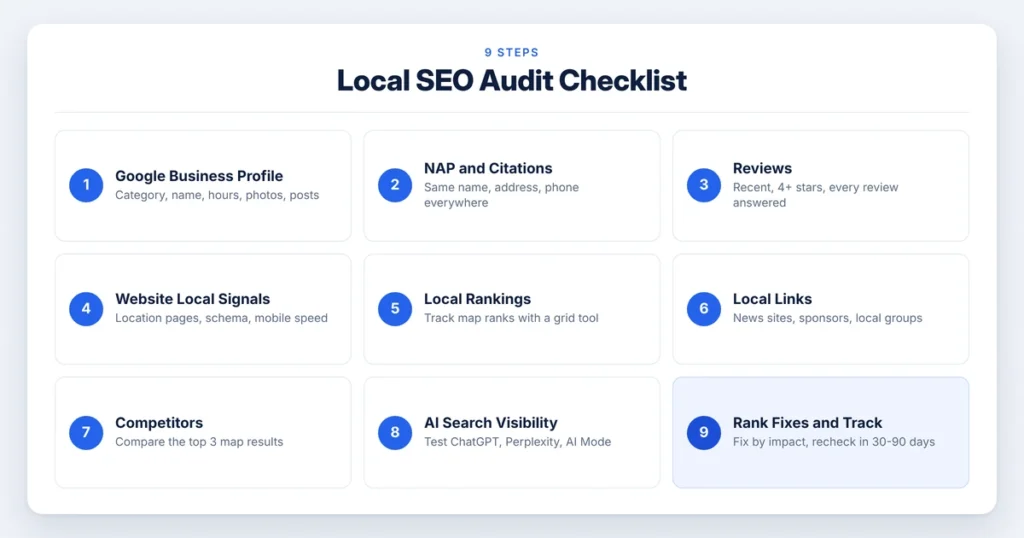
🔁 These local SEO optimization tips work best as a routine. So, save this list and reuse it at every audit.
Get Help With Your Local SEO Audit
A local SEO audit shows you why nearby customers find your competitors first, and what to do about it. If you’d like an expert to check it for you, Technical Kalyan can help. As a Local SEO and AI Search specialist, Kalyan reviews your Google Business Profile, citations, reviews, and website by hand. Then you get a clear, ranked fix list within 24 to 48 hours. Request your free local SEO audit and start winning more customers near you.
Frequently Asked Questions
Q: What is a local SEO audit?
A: It’s a review of how well your business shows up in local search. It checks your Google Business Profile, listings, reviews, and website, then ranks the fixes.
Q: How long does a local SEO audit take?
A: For one location, a basic audit often takes a few hours to a full day. Businesses with many locations need more time.
Q: What is the most important part of a local SEO audit?
A: For most businesses, it’s the Google Business Profile. Experts rank the primary category as the top factor for map rankings.
Q: Can I do a local SEO audit myself?
A: Yes. Free tools like Google Business Profile, Search Console, and PageSpeed Insights cover most steps. Paid tools help most with citations and grid rankings.
Q: How do I improve local SEO rankings after an audit?
A: Fix your profile details first. Then clean up your citations and build a steady flow of reviews. After that, improve your location pages and earn local links.
Q: Does a local SEO audit help with AI search?
A: Yes. AI tools use your profile, reviews, and listings to choose which businesses to suggest. So, clean and consistent details help you appear in AI answers too.

Kolkata-based SEO consultant and AI Search specialist with 7+ years of experience helping businesses improve their online visibility and organic growth. He specializes in Local SEO, Google Business Profile optimization, AEO, and GEO. With 70+ successful projects across India and international markets, Kalyan helps businesses build stronger visibility across Google Search, Google Maps, ChatGPT, Perplexity, Gemini, Claude, and other AI-powered search platforms. Through Technical Kalyan, he focuses on practical, sustainable search strategies that help local and service-based businesses attract more relevant customers and stay competitive as search continues to evolve in the AI era.